SaaS Support Coverage
Legacy SaaS Support Coverage
This article is a compilation of the legacy Liferay SaaS Support Coverage policies.
- Available Regions for Liferay SaaS
- Cross Region Disaster Recovery Add-On for SaaS
- Going Live on Liferay SaaS
- Liferay SaaS Business Continuity
- Liferay SaaS Client Extensions
- Liferay SaaS Compatibility Matrix
- Liferay SaaS Data and Backups
- Liferay SaaS Maintenance and Release Schedule
- Liferay SaaS Monitoring Mechanisms
- Liferay SaaS Network and Security
- Liferay SaaS Performance and Penetration Test - Advanced Notice
- Liferay SaaS Plans
- Liferay SaaS Product Details
- Liferay SaaS Quotas and Limitations
- Liferay SaaS Shared Activities
- Liferay SaaS Site-Type Definitions
- Premium Flexibility Add-On for SaaS
Available Regions for Liferay SaaS
Below is the list of available Liferay SaaS regions:
- North America (United States)
- South America (Brazil)
- Europe (EU)
- Middle East (Saudi Arabia)
- East Asia (Japan)
- Asia Pacific (Australia)
Cross Region Disaster Recovery Add-On for SaaS
Liferay manages automatic zonal disaster recovery for our customers. This means that if a zone goes unavailable in the region where the customer’s data is hosted, the SaaS service would be still available from a different zone within the same region.
Some customers might require Liferay to ensure that their site is available even when the whole region goes down. With the Cross Region Disaster Recovery add-on, customers can have Liferay manage a disaster recovery (DR) site in another region in the case of such a disaster event. Due to data privacy rules, Liferay offers these DR cluster regions currently:
Live Cluster Region |
DR Cluster Region |
|---|---|
Europe |
East Asia (Japan) |
US Central |
Europe |
South America |
Europe |
East Asia (Japan) |
Europe |
Australia |
Europe |
The DR procedures are agreed upon during the customer onboarding. The Customer can specify the conditions under which Liferay executes the failover procedures, including pre-authorization for Liferay to automatically execute DR steps when certain criteria and conditions are met, without needing to wait for customer confirmation. Liferay will monitor the customer’s site and execute these incident management workflows according to the agreement with the customer.
Liferay can execute the DNS changes for the customer if their DNS supports CNAME or ALIAS records. In other cases, the customer has to take care of redirecting the DNS.
Deploying and keeping the client extensions up to date on the DR environment is the customers' responsibility. So, whenever a customer deploys a new version of a client extension to their production environment, the deployment should be made to the DR environment as well.
The RPO* depends on the customer’s data set. Liferay targets a four-hour RPO, to migrate the data over to the customer’s DR site. The RTO** is 15 minutes once the failover decision has been made.
*RPO (Recovery Point Objective): the maximum data loss in case of an incident. It is defined by the maximum duration from the time when the last backup has been taken.
**RTO (Recovery Time Objective): the maximum time the service is down after the failover switch was decided.
Going Live on Liferay SaaS
There are a few important steps that Liferay SaaS customers must take before making their site available to their end users. This page covers the steps and necessary configurations needed for a successful go-live.
Preparation Requirements
In order to start the go-live process, please submit a ticket to Liferay Support at least 8 days before activating the production site and include the following information.
- The planned go-live date
- Whether a custom SSL certificate will be used
- If so, please provide the certificate
- Whether a custom domain will be used
- If so, please provide the domain
- And create a DNS record with your provider (see below for types of DNS records to create)
Note: After you configure your domain settings, Liferay will automatically begin generating an SSL certificate for your site. This process, typically completed within 20 minutes, is strategically scheduled during a maintenance window to prevent service disruptions. If you prefer to use a custom SSL certificate instead of the default one provided by Liferay, please submit it through a support ticket.
Go-Live Steps
If the domain is being transferred from another site, these steps will need to be done at the time of the go-live. Please plan for some downtime for transferring a domain, especially if Liferay's SSL certificate will be used on the site. If this is a brand new site, these steps can be done ahead of time.
- Add new domain to DXP
- Change the DNS record to point to the cloud domain
Creating a DNS Record
- Liferay requires a CNAME record to be created for the domain associated with the project (<yourprojectid>.lxc.liferay.com). This project ID is provided during the provisioning process. If you can't find your project ID, navigate to your Client Extensions environment and copy the section of the URL just before the "-"(ext<4digitcode><yourprojectid>-extprd). If you still can't find your project please contact Support.
- Note that some DNS providers do not offer CNAME records to base domain names. In this case customers should try to use the ALIAS record. If an alias is not available, customers can use an A record.
Custom SSL Certificates
Consider the following when using a custom SSL certificate.
- The SSL certificate should contain the intermediate certificates as well.
- Before the certificate is about to expire, please provide Liferay with a new certificate dated before the last scheduled maintenance window to avoid interruption.
- When a customer would like to share a SSL certificate with Liferay, it is necessary to use the Large File Uploader instead of the normal ticket attachments. It is also recommended to upload it by using a .zip file protected with password and also to share the password through a separated channel.
Transferring Domains and TTL
When transferring a domain, DNS caching can have a negative impact on the switch-over. In order to avoid this, reduce the Time To Live(TTL) to a few minutes a few days ahead of the go-live. This can be returned to the original value after go-live.
Additional Information
Liferay SaaS Business Continuity
Ensuring that your site is up, running, and accessible to your users is paramount. This is why Liferay stands by our Monthly Application Availability (MAA) commitment of 99.8% or greater for Liferay SaaS customer projects. Liferay provides business continuity that you can depend on.
Data Redundancy
To enhance data reliability and availability, our databases are configured within a Multi-Availability Zone (Multi-AZ) environment. This strategic configuration consistently replicates your data across different secure, isolated locations, mitigating risk by ensuring that it isn’t susceptible to a single point of failure.
High Availability
Uptime and reliability are of the utmost importance.. This is why Liferay SaaS environments employ multiple instances of services such as Liferay DXP, the Search Engine, and the Web Server in order to achieve a high level of availability. This redundancy reduces the risk of downtime or interruption of your business-critical processes.
Scalability
Sometimes unexpected scenarios lead to increased load on a site. When this happens, Liferay SaaS services are equipped to scale both horizontally (adding more machines) and vertically (adding more power to an existing machine) to meet the demand. Then, once the high traffic event concludes, the services scale down to normal size. This feature is automatic, seamless, and requires no customer intervention.
Disaster Recovery
Redundancy, high availability, and backups are even more critical when disaster strikes. In the unlikely event of a major outage, Liferay’s disaster recovery plan leverages all of our continuity tools to get things back up and running. You can have the peace of mind that, even in the most critical of incidents, Liferay has you covered. If you have questions about the disaster recovery plan, submit a ticket and our support staff will get them answered.
Developing for Liferay SaaS
With Liferay SaaS and Client Extensions, we have what you need to achieve the solution you want. And if you want to go further and do more, our technology allows you to build your Liferay solution with your own tools and integrate it.
Liferay SaaS Client Extensions
Client Extensions provide customizable features for Liferay environments without altering DXP itself or using OSGi modules. Client Extensions interface only with Liferay's APIs, promoting flexibility and compatibility across upgrades. In essence, they enable you to tailor your site’s experience to suit your business needs while preserving your ability to stay up to date on new features and capabilities. For more information on how to leverage this versatile tool, visit Client Extensions.
Quota and Limitations
Client Extensions can be managed from the Extensions environments in the Cloud Console. You can deploy as many Client Extensions as you need up to the environment’s resource limit. The resources allocated to an Extensions environment depend on the subscription plan. For more information on these plans, see Liferay SaaS Plans.
Performance Metrics
Client Extension CPU and Memory utilization metrics can be monitored in real time via the Cloud Console. This allows for efficient resource management and timely performance optimizations.
Uptime
Client Extensions are built and managed solely by the customer. This means that the uptime of extension applications is the responsibility of the customer. It is important to note that the application Service Level Agreement (SLA) provided for the platform does not extend to Client Extensions. Therefore, downtime for these extensions is not covered under the platform's SLA.
Troubleshooting
Customers can troubleshoot issues with Client Extensions using the Shell. Shell access, available through the Cloud Console, allows customers to run scripts, view and edit files, and perform other troubleshooting techniques to better understand the behavior of their running Client Extension containers. See Shell Access for more information.
Deployment Mechanisms
Deploying Client Extensions is easy. The Liferay Cloud Command Line Interface(LCP CLI) allows customers to quickly deploy their Client Extensions to the cloud. The CLI also allows customers to quickly restart, review the logs of, or shell into their Client Extension containers. See Command-Line Tool for more information.
Source Code
In order to avoid inhibiting the sovereignty of customer source code, Liferay does not provide a repository for hosting Client Extensions code. We ask that customers manage source code and version control using an external repository hosting provider such as GitHub.
Cloud Console
The Cloud Console is the center of the Liferay SaaS development experience. Developers can deploy, monitor, and manage Client Extensions all from one location. In addition to managing Client Extensions, the Cloud Console enables customers to configure team member access, review logging and audit events, monitor resource usage, and troubleshoot issues.
Liferay SaaS Compatibility Matrix
Liferay DXP is the heart of Liferay SaaS. But not every DXP feature is applicable to every deployment method. Some DXP features are limited in the cloud context. This article lists many common DXP features and their compatibility with Liferay SaaS.
Feature |
Liferay SaaS Compatibility |
Comments |
|---|---|---|
| Server Administration | Not Available | Server administration, resource actions, groovy scripting, custom log levels or system settings are not accessible. Some functionalities such as Search reindex can be requested through a Help Center ticket. |
| Manage Cloud Service Stack (Liferay DXP, Search, Database, Web Server, Backup) | Not Available | The Liferay Cloud Service stack including image versions, stack versions, individual service versions, and environment backup are managed by Liferay. |
| Deploying Custom OSGi Modules | Not Available | Deploying custom OSGi Modules is not available. Any change in behavior needed should be accomplished using Client Extension and remote extension points. |
| Groovy Scripts | Not Available | The use of Groovy scripts is not available; this includes areas like Server Administration, Object actions, and Workflows. Client Extension and remote extension points should be used instead. |
| Custom Liferay DXP Patch Levels | Not Available | All patching responsibilities, inclusive of updates, hotfixes, and security hotfixes, are handled by Liferay. |
| Accessing Application Logs | Available | It is now available in the Extension Environments log tab. For assistance resolving any issues please open a Help Center ticket. |
| Liferay APIs | Compatible | JSONWS and Headless API calls are accessible in all environments. Limited to 5,000 calls per user, per hour. |
| Instance Settings | Compatible | Client Extensions can be used to modify or configure instance settings. |
| Custom Liferay DXP Portal Properties (portal-ext.properties) | Limited Compatibility | Many configurations can be changed within the site or instance settings. If a configuration is only available through a portal property value change, then please open a Help Center ticket in order to request the change. Liferay does not guarantee all change requests will be made. |
| Basic Auth Header - Authentication Verifier | Not Available | This auth verifier is disabled for security purposes. |
| Digest Header - Authentication Verifier | Not Available | This auth verifier is disabled for security purposes. |
| Single Sign On | Compatible | |
| WebDav | Not Available | WebDav, which uses Basic or Digest Authentication, is not enabled in the Liferay SaaS platform for security purposes.. |
| Site Creation | Compatible (limited by plan quota) | Although the Liferay DXP UI does not restrict the number of sites available within an instance, some Liferay SaaS plans restrict the number of sites a customer should create. See Liferay SaaS Plans for more information. |
| Connecting Third-Party CDN Providers (Cloudflare, Akamai etc.) | Not Available | Liferay SaaS is equipped with a CDN. |
| Custom External WAF | Not Available | Liferay SaaS is equipped with a Web Application Firewall (WAF). Connecting to an additional WAF is not available. |
| IP Filtering | Compatible | IP configuration such as custom whitelisting or blacklisting can be requested by opening a Help Center ticket. |
| VPN | Compatible (Client-to-site option only) | A VPN connection to the DXP instance can be requested by opening a Help Center ticket. A client-to-site VPN can be made available using OpenVPN or IKEv2 protocols. Please note that the "dedicated resources" add-on is necessary to request this. |
| Self-Service Backup Capabilities | Not Available | Liferay assumes control of all backup operations, conducting daily backup routines across all Liferay SaaS environments. Customers do not have the ability to configure their own backup routines or restore from backups. |
| Remote Staging | Not Available | Publications is available as an alternative. |
| Template Engines | Limited Compatibility | The following Classes, Methods, and Variables are restricted: java.lang.Class java.lang.Thread java.lang.System serviceLocator objectUtil staticUtil |
| Custom SSL | Compatible | Liferay can install customer generated SSL certificates for custom domains. Please open a Help Center ticket to request the installation. More information can be found here. |
| SMTP (Mail) Server | Compatible | Liferay SaaS is equipped with an SMTP mail server or can connect to a custom SMTP provider. |
| Dynatrace | Not Available | Liferay SaaS is not equipped with Dynatrace monitoring.EXT Environments and Client Extensions can be monitored through Dynatrace. However, this requires additional configuration and a Dynatrace subscription is not included with a Liferay SaaS Subscription.
|
Liferay SaaS Data and Backups
Liferay is committed to data integrity. There are several systems and processes in place to protect against data loss and maintain data security. Here is a look at some of the protections we have in place to keep your data safe, secure, and up to date.
Data Backups
Liferay makes sure that your environment is prepared for the unlikely event of a data issue. Backups of your database and document library are taken on a regular basis and can be used to restore the environment to a previous state should the need arise. Backups are initiated and managed by Liferay so there’s no additional maintenance or steps required by the customer. If a backup or restore is needed, or you’d like a copy of your data, simply submit a ticket and our support team will assist you(note that backups have a retention period of 30 days).
Data Import/Export
For user managed data transferring, customers can leverage LAR files. With LAR files, content like pages and widgets can be downloaded and uploaded to and from sites at will. Additionally, documents can be accessed and downloaded directly from the Document Library.
Recovery Point Objective (RPO) and Recovery Time Objective (RTO)
Our regular data backup procedures allow us to maintain competitive recovery objectives for Liferay SaaS environments. The RPO in Liferay SaaS is set at 8 hours, meaning the maximum data loss in case of an incident would be the last 8 hours of data. The RTO is defined at 5 hours for default storage, indicating the maximum duration that service can be down in case of an incident. Please note that these metrics might increase depending on the volume of extra storage purchased.
Data Regions and Backups
We understand the importance of data sovereignty and therefore maintain strict policies to safeguard your data. Backups containing the customer's data are restricted to the predefined Data Region and are never transported outside of this region, whether physically or through network routing, upholding data residency compliance. See Available Regions for Liferay SaaS for a current list of regions.
Data Encryption
All sensitive, private, and restricted data stored in our databases is securely encrypted at rest using the advanced AES-256 encryption standard. For key management, we use Google-Managed Encryption Keys (GMEKs) to provide an additional layer of security. Please note that, as of now, we do not support Customer-Managed Encryption Keys (CMEKs). All data in transit is protected using enforced SSL connections, which also employ a minimum of AES-256 encryption to safeguard your data transmissions.
Liferay SaaS Maintenance and Release Schedule
Liferay SaaS is an evolving product with updates and features being released at a steady pace. Amidst that effort, we also want to provide a dependable environment for our customers to be informed and well prepared as they use the platform. This is why Liferay has established a transparent release cadence strategy.
The release strategy consists of three types of release windows, or opportunities, for Liferay to release changes or fixes to the Liferay SaaS. There are three types of maintenance windows:
DXP Maintenance Windows
4 Hours, Regional Time Zone
Weekly DXP maintenance windows are a fixed update window whose time is determined by Liferay, based on the customer-selected deployment region and that region's time zone. During these maintenance windows Liferay will regularly update the running database and the DXP instance.
During this maintenance window, 1-2 short downtimes can be expected almost every week.
Just before the update, Liferay will verify updates install correctly without issues in order to reduce downtime. Liferay will attempt the update on a copy of the production database, checking for data or product issues. Liferay will also execute end-to-end tests to ensure the quality of the update. Liferay and the customer work to establish these predefined test plans ensuring that custom business use-cases are properly covered. If these tasks are successful, then the same process will be completed on the production and the non-production systems together.
If you have any questions, please open a support ticket.
Platform Maintenance Windows
Tuesdays and Thursdays between 8 a.m. and 8 p.m., Pacific Time Zone
Platform maintenance windows are fixed windows used to improve the Liferay Cloud Platform through new releases, configuration changes, or bug fixes. This window is every week on Tuesdays and Thursdays from 8 a.m. to 8 p.m. Pacific Time, or any other time that is communicated at least 14 days in advance. Nearly all releases can be accomplished with zero downtime or outage to the customer's application. As with any system, the larger the change, the higher the risk of unexpected downtime. Liferay will communicate with customers about any known downtime due to maintenance/releases at least 14 days in advance.
Detail and a yearly calendar can be found here.
Emergency Maintenance Windows
When Necessary
If necessary, critical zero-day security or reliability changes can be installed by Liferay at any time without prior notice. Liferay is committed to the uptime of our customer environments and carefully manages uptime when mitigating security and reliability issues.
Liferay SaaS Monitoring Mechanisms
With Liferay SaaS, your environment always has eyes on it to ensure that it is live and performant. Your subscription includes Liferay monitoring as well as tools for your team to perform additional monitoring.
Status Dashboard
Notice a problem? Chances are, we’re already investigating it. But if you’d like to stay up to date on the status of all of the systems associated with Liferay Cloud, you can do so by visiting status.liferay.cloud. This page also allows you to subscribe and receive system status and incident notifications.
Liferay's 24x7 Monitoring Services
Your Liferay SaaS subscription comes with 24x7 monitoring. Our team of experts is primed and ready to respond to an incident regardless of when it may occur. Our proactive support team is alerted not only when a site is unresponsive, but when there are signs and trends that can lead to downtime. The team will investigate these anomalies and take corrective measures. If a situation necessitates customer intervention, the team will promptly get in touch with your designated contact.
Liferay SaaS Network and Security
This article has moved. It is now available at the "Standards-Compliant Security and Network Capabilities" under THIS ARTICLE.
For information regarding Performance and Penetration Test Policies, please see:
- Liferay SaaS Performance and Penetration test - Advanced Notice
- Liferay PaaS Performance and Penetration Test - Advanced Notice
Liferay SaaS Performance and Penetration Test - Advanced Notice
Customer-Initiated Security Testing
When performance and/or penetration testing is performed, it can appear to Liferay that an attack is being executed against a customer environment.
Please observe the following policies regarding customer-initiated testing for Liferay SaaS below:
- Liferay SaaS Extensions environment: customers may conduct security penetration and stress testing.
- Liferay SaaS DXP environment: customers are disallowed from running DoS (stress/load) testing. Customers may conduct security penetration testing only if:
- The customer has the Dedicated Resources add-on, AND
- They have prior approval from Liferay.
Please request approval for penetration testing at least 15 days in advance of the testing window. You can submit the request by opening a support ticket on Help Center and providing the following information:
- Time and duration of the test.
- Source IP addresses from which the testing will be executed.
- Target domains or IP addresses (scope).
- Test type(s).
Additional Information
- Liferay PaaS Performance and Penetration Test - Advanced Notice
- Liferay Cloud - Getting Started
- Liferay Cloud Infrastructure
Liferay SaaS Plans
Liferay SaaS has the capabilities needed to launch and run a wide variety of applications designed by you and maintained by Liferay. Some applications are simple and require minimal resources while others are complex and require more. This article covers the plans Liferay offers to meet the various needs of Liferay SaaS customers as well as the resources allocated to each plan.
Definitions
- MALU: Monthly Active Logged-in Users - The aggregate number of authenticated users that have visited each customer site at least once in the calendar month.
- APV: Anonymous Page Views - The aggregate number of anonymous page views across all customer sites during a subscription term.
Plan Resources
| Pro | Business | Enterprise | |
| # of Sites | 2 Sites | 15 Sites | Unlimited |
| # of Domains | 1 domain | 10 domains | 15 domains |
| Document Library Size* | 50GB | 100GB | 300GB |
| # of project workspaces | 1 | 5 | 10 |
| Response SLA | Gold | Gold | Platinum |
| Extensions Capacity* | 1 GB / 1 vCPU | 4 GB / 8 vCPU | 6 GB / 12 vCPU |
| # of Transactions** | 500 | Unlimited | |
| UAT Cloud Sandbox | Yes | Yes | Yes |
| Dev Cloud Sandbox | No | Yes | Yes |
| Dedicated Resources Available for Purchase | No | No | Yes |
| # of emails | 10,000 per month | ||
| Database Size | 50GB | ||
| # of Deployments of Client Extensions | 9,000 deployments per month (500 Client Extensions deployments per day) |
||
| MALUs | 100 MALUs(can be increased by purchasing additional packages) |
||
| APVs | 100,000 APVs(can be increased by purchasing additional packages) |
||
* Add-ons may be purchased to expand Document Library Size and Extensions Capacity.
** A “transaction” is defined as a “completed checkout in Commerce” where a purchase or order is made. Using other Commerce functionality such as product catalog does not count as a transaction.
Please be aware that the resources, such as Document Library Size, Extensions Capacity, and Database Size are shared across all environments within a customer's subscription. This means that usage is distributed among the different environments as required. Because of this, customers should consider their resource needs across all environments when selecting a subscription and plan accordingly.
Resource & Usage Monitoring
Resources can be monitored on the Project Usage page of the Customer Portal. This page shows how much of the allotted resources have been used and the maximum allotment for the current subscription.
Calculations
- Requests performed by unknown(Guest) users are excluded from MALU calculations. Each user will be counted once for each site they access in a calendar month.
- Requests coming from Liferay Monitoring/Health Check Systems and popular Internet crawler bots are filtered out of APV calculations. Headless calls, External services requests and other types of bots are counted.
- Identical IP addresses requesting the same resource within a 10-minute window are counted as a single APV.
- MALU and APV consumption is tracked across all environments(prd, uat, dev, etc.).
- These metrics reset at the end of the current subscription period.
Additional Information
If you have questions about your plan or add-ons, please submit a ticket and Liferay Support will be happy to assist you.
Liferay SaaS Product Details
Introduction
Meet Liferay SaaS: Liferay’s flexible Digital Experience Software-as-a-Service offering to create, launch, and optimize digital solutions with the agility and convenience of SaaS.
First, it is important to keep in mind that Liferay SaaS is not a turnkey application - it is Liferay DXP deployed in a SaaS approach.
Since Liferay SaaS is hosted and fully managed by the Liferay team, organizations can focus on launching new digital experiences quickly to support their business initiatives. We update the platform regularly so it can benefit from the fixes, improvements, and security updates developed for the Liferay Digital Experience Platform (DXP), so customers can always count on the innovation velocity of Liferay, our partners, and our global community without worrying about upgrades or keeping up to date with new features.
This document describes the resource quotas and technical product details of Liferay SaaS.
Product Description
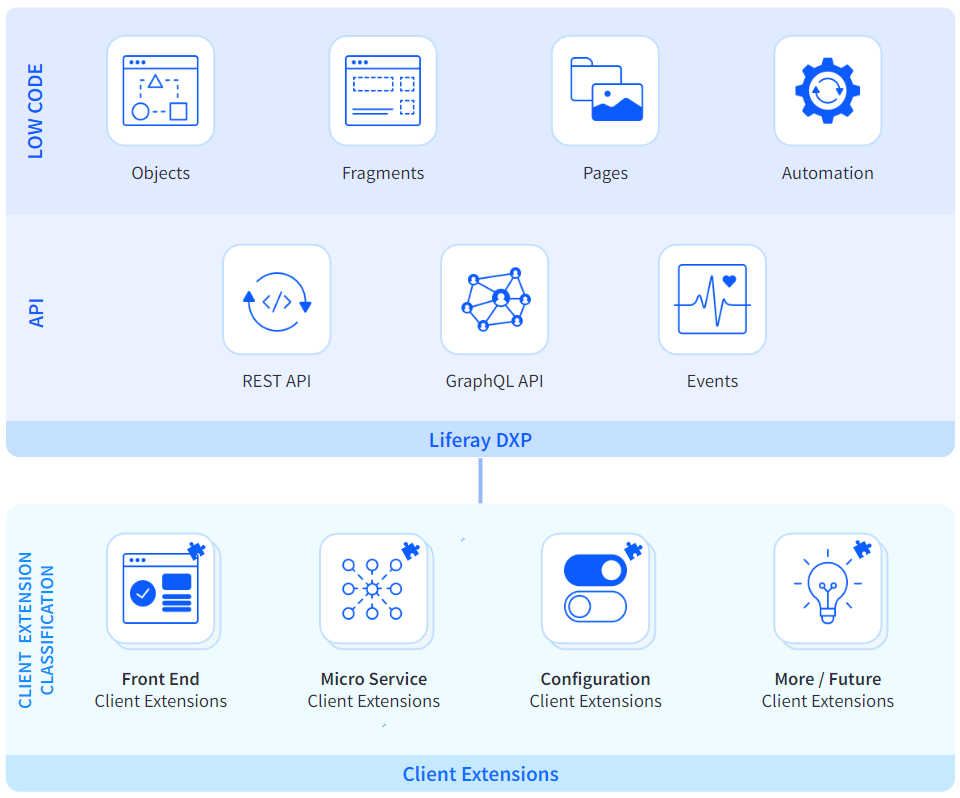
Liferay SaaS offers a DXP-as-a-service model, integrating two key components: Liferay DXP management by Liferay or DXP-as-a-service and a Cloud Console for managing Client Extension environments. This unique architecture allows for a clear division of responsibilities between Liferay and the customers, enabling efficient management of digital experiences.
Under the DXP-as-a-service model, Liferay takes responsibility for the administration of the Digital Experience Platform (DXP). This includes managing DXP upgrades, conducting regular security scans, and monitoring application uptime. By handling these tasks, Liferay ensures the platform's smooth operation and secure environment.
In the DXP-as-a-service model, the design patterns of Liferay DXP and the focus on "customization without compromise" ensures a seamless fit for business needs and simplified platform management and evolution. This is achieved through Low Code configurations, which enables increasingly effortless customization, and Client Extensions that allow direct, but isolated, Liferay customization. These patterns work together to fulfill a wide array of enterprise use cases for custom DXP-based solutions.
By expanding our services to include the management, patching, and updating of Liferay DXP, customers are able to focus solely on accomplishing their business needs through Client Extensions and Low Code Configurations. Client Extensions offer the versatility of direct Liferay customization, but in a neatly isolated manner that does not affect your ability to upgrade and maintain Liferay.
The Cloud Console is Liferay SaaS' customer-facing cloud administration system, designed to facilitate the management of Client Extension environments and DevOps tools. This includes full control of the Software Development Life Cycle (SDLC) for Client Extensions, providing customers with the flexibility to customize their applications as required.
|
 |
Feature List
Here is an overview of the capabilities available to customers using Liferay SaaS:
- Digital Experience Management: Create, organize, and deliver personalized digital experiences across multiple channels, devices, and websites.
- Navigation and Discovery: Enhance user experience by managing site navigation, organizing content, and offering a unified search experience.
- Content Management and Operations: Manage various content types, including assets, web content, documents, media, and product information.
- Collaboration and Knowledge Sharing: Empower users with tools like blogs, alerts, announcements, knowledge bases, social tools, wikis, forums, and message boards.
- Orders and Fulfillment: Process orders, design workflows, manage subscriptions, and shipments.
- Personalization and Experimentation: Deliver personalized experiences, conduct A/B testing, and provide content recommendations based on user interests.
- Analytics and Optimization: Monitor and improve digital experiences through dashboards, site and asset analytics, and traffic analysis.
- Customer Data Management: Centralized customer data, analyze user behavior, segment customers, and unify data from various sources.
- Identity Management and Governance: Manage user data, personal information, authentication, and service access policies.
- Data Modeling, Process, and Business Logic: Design custom data models, capture user information, and manage process automation.
Liferay SaaS Quotas and Limitations
This article details the quotas and limitations of the Liferay SaaS offering.
All limits shown as per month.
| Quota Name | Quota Limit |
|---|---|
| # of max MALU | 10x the total MALU's purchased |
| # of e-mails | 10,000 emails |
| # of monthly active logged users (MALU) | Dependent on purchase |
| Document Library Size | 50 GB (The storage will be shared across production and testing |
| Database Size | 50 GB (For an increase on the Database, please reach out to the Liferay team.) |
| # of Client Extensions | Each environment has a quota of 4GB memory and 8 CPUs. This capacity can be distributed across a maximum of 8 Client Extensions. Additional capacity may be purchased during the Sales cycle. |
| # of Deployments of Client Extensions | 9,000 deployments Client Extensions will be deployed to the EXT environment via |
| # of Sites | The default is 1 site. But projects can expand up to a maximum of 200 sites. |
| # of Custom Domains | There is a limit of 200 custom domains per project. |
MALU: Monthly Active Logged Users
Liferay SaaS Shared Activities
Below is a summary of various activities that are shared between your team and the Liferay Cloud team. If you need assistance in understanding or executing these tasks, submit a ticket and Liferay Support will be happy to assist.
| Activity | Liferay will... | As a Customer, I should... |
| Provide and maintain the Liferay Cloud infrastructure | Implement bug fixes, new features, and improvements for the Liferay Cloud Infrastructure and provide status updates for the Liferay Cloud Infrastructure at status.liferay.cloud | |
| Deploy the Liferay Cloud Service Stack | Deploy and maintain the default Liferay DXP, Enterprise Search, Database, CI Server, Web Server, Backup Services as well as Commerce and Analytics Cloud | Submit a ticket if service configurations are needed |
| Develop and implement customizations | Provide features and tools to allow for development and deployment of customizations | Develop and deploy custom solutions via Client Extensions |
| Upgrade software | Update the Liferay Cloud Infrastructure, publish all the Service versions, and deploy new Services to customer environments | Test application after maintenance windows |
| Monitor infrastructure | Monitor the Liferay Cloud Infrastructure and provide monitoring tools for customer environments | Monitor custom solutions and submit a ticket in the event of an infrastructure issue |
| Autoscaling | Provide Autoscaling functionality and leverage it to maintain customer environment uptime | |
| Backup and restore | Perform regular backups and restore data in a disaster recovery event | Submit a ticket to request backup downloads if needed |
| Security | Report and resolve Sev 1 Security Vulnerabilities within the Liferay Cloud Service Stack and implement security and authentication best practices for infrastructure and Service Stack | Implement security best practices for custom solutions |
Liferay SaaS Site-Type Definitions
Here is a breakdown of the three different site-types you can build with Liferay SaaS and the capabilities that you will have at your disposal for each. Please click on any of the individual capabilities to find more information on that feature in our product documentation.
"Engage"Create personalized web experiences that attract and empower customers. |
"Support"Decrease your customer support costs with effective self-service. |
"Transact"Grow online revenue with first class self-service experiences. |
|
|---|---|---|---|
Capabilities |
|||
Digital Experience ManagementAuthor, organize and deliver rich, engaging and personalized digital experiences across multiple channels and devices |
|||
| Manage multiple branded web sites | ✅ | ✅ | ✅ |
| Design the web site appearance | ✅ | ✅ | ✅ |
| Publishing workflows and version management | ✅ | ✅ | ✅ |
| Search Engine Optimization | ✅ | ✅ | ✅ |
| Content Accessibility | ✅ | ✅ | ✅ |
| Content Localization | ✅ | ✅ | ✅ |
| Multichannel experiences | ✅ | ✅ | ✅ |
| Manage multiple storefronts | ✅ | ✅ | ✅ |
Navigation and DiscoveryEmpower users to locate and discover information, services and the resources they need |
|||
| Manage site navigation | ✅ | ✅ | ✅ |
| Organize content with tags and categories | ✅ | ✅ | ✅ |
| Unified search experience | ✅ | ✅ | ✅ |
Content Management and OperationsCreate, organize and manage different content types |
|||
| Manage Assets | ✅ | ✅ | ✅ |
| Manage Web content and structure | ✅ | ✅ | ✅ |
| Manage documents and media | ✅ | ✅ | ✅ |
| Manage multiple product catalogs | ✅ | ✅ | ✅ |
| Manage Product Information | ✅ | ✅ | ✅ |
| Manage Product Pricing | ✅ | ||
| Manage Product Inventory | ✅ | ||
| Manage Promotions and Discounts | ✅ | ||
Collaboration and Knowledge SharingEmpower users to work together as a community to exchange information and achieve common business goals |
|||
| Blogs | ✅ | ✅ | ✅ |
| Alerts and Announcements | ✅ | ✅ | ✅ |
| User Invites | ✅ | ✅ | ✅ |
| Knowledge Base | ✅ | ✅ | |
| Social Tools | ✅ | ✅ | |
| Wiki | ✅ | ✅ | |
| Forums and Message Boards | ✅ | ✅ | |
Orders and Fulfillment |
|||
| Process Orders | ✅ | ||
| Design Order Workflows | ✅ | ||
| Subscription Management | ✅ | ||
| Manage Shipments | ✅ | ||
Personalization and ExperimentationEnsure a relevant and personalized experience is delivered to users based on past behavior and created segments |
|||
| Personalize experiences for different user segments | ✅ | ✅ | ✅ |
| Run A/B testing to improve business outcomes | ✅ | ✅ | ✅ |
| User Interests and Content Recommendation | ✅ | ✅ | ✅ |
Analytics and OptimizationAssess and improve the effectiveness and outcomes delivered through the digital experiences |
|||
| Content dashboard | ✅ | ✅ | ✅ |
| Site analytics | ✅ | ✅ | ✅ |
| Asset analytics | ✅ | ✅ | ✅ |
| Traffic and Path Analysis | ✅ | ✅ | ✅ |
Customer Data ManagementCentralize disparate customer data to get a 360 degree view of customers and better understand customer behaviors and segments |
|||
| Users and Account analysis | ✅ | ✅ | ✅ |
| Static and Dynamic Segmentation | ✅ | ✅ | ✅ |
| Unify customer data from different sources | ✅ | ✅ | ✅ |
Identity Management and Governance |
|||
| User, Organization and Account Management | ✅ | ✅ | ✅ |
| Personal Data Management | ✅ | ✅ | ✅ |
| Identity Management and Authentication | ✅ | ✅ | ✅ |
| Service Access Policies | ✅ | ✅ | ✅ |
Data Modeling, Process and Business Logic |
|||
| Design custom data models | ✅ | ✅ | ✅ |
| Capture data and information from users | ✅ | ✅ | ✅ |
| Design and manage process automation | ✅ | ✅ | ✅ |
Premium Flexibility Add-On for SaaS
With this add-on customers can select a four-hour interval as maintenance window for their SaaS project including weekends.
The maintenance window will be set weekly at the same day and time. Customers can choose the maintenance window by opening a support ticket and requesting the change to the time which fits their schedule. Liferay requests these to be opened at least one week in advance.
With this add-on, customers can request to delay a DXP upgrade by up to one year, which corresponds to four quarterly releases. By default, DXP upgrades occur at least once every two quarterly releases. However, with the Premium Flexibility Add-On for SaaS, upgrades can be postponed for up to four quarterly releases, based on the official release dates of those versions.